


Share
.svg)
.svg)
.svg)
AWS Marketplace is a procurement and distribution channel where businesses can discover, buy, and sell software, data, and professional services that work with AWS.
For independent software vendors (ISVs), AWS Marketplace can do more than provide another place to list a product. It can become a sales channel for enterprise deals, a way to simplify sales processes, a route to AWS-assisted selling, and a mechanism for managing private offers and partner-led transactions.
This guide explains how AWS Marketplace works, what you can sell, how to get listed, how pricing and fees work, and how to use private offers, CPPO, and AWS co-sell to scale Marketplace revenue.
TL;DR
- AWS Marketplace is a digital procurement channel for third-party software, data, and services that work with AWS
- SaaS, AMIs, containers, machine learning products, AI agents, and professional services can be sold through AWS Marketplace, subject to AWS requirements
- To start selling, you need to register as a seller, meet eligibility requirements, create a product listing, complete the required technical integration, and pass AWS review
- SaaS products can use subscription, contract, or contract-with-consumption models, depending on the product setup
- Private offers let sellers negotiate customer-specific pricing and commercial terms instead of relying on public Marketplace pricing
- CPPO lets authorized AWS Marketplace channel partners resell an ISV's products through their own private offers
- AWS co-sell connects an ISV's sales motion with AWS field teams through AWS Partner Central and ACE
- AWS Marketplace charges listing fees that vary by product and transaction type. SaaS public offers are currently 3%, while server products such as AMIs, containers, and machine learning products have different fees. Private offer listing fees depend on deal value
- Marketplace operations become more complex as deal volume grows. Teams often need processes for listings, offers, CRM workflows, co-sell, renewals, reporting, and revenue reconciliation. That’s where Clazar helps
What is AWS Marketplace?
AWS Marketplace is a digital catalog where customers can discover, purchase, and deploy third-party software, data, and professional services that work with AWS.
For buyers, Marketplace provides a centralized procurement path for AWS-related products. For sellers, it provides access to AWS customers and infrastructure for transactions, billing, and disbursement.
The exact buying and deployment experience depends on the product type.
How does AWS Marketplace work for buyers?
On the AWS Marketplace, buyers can:
- Browse through thousands of listings for security, business apps, ML, data, etc., from leading vendors
- Review the product details, vendor info, security profiles, and often free trials
- Purchase using flexible options (hourly, annual, BYOL) with unified billing on their AWS invoice.
- Launch pre-configured solutions (AMIs, SaaS, Containers) with a few clicks, often integrated directly into their AWS environment
- Centralize spending, track usage, and manage licenses through their AWS account
How does AWS Marketplace work for sellers/ partners?
An ISV, VAR (Value Added Reseller), or SI (Systems Integrator) can:
- List their software on the AWS marketplace
- Reach a vast global audience of AWS users
- Set pricing, offer trials, and manage contracts
- Integrate “Buy with AWS” buttons on their websites, so purchases are even more seamless for their customers
- Use public offers, private offers, and partner motions to transact
- Receive streamlined disbursements, since AWS handles invoicing and payments
Why sell on AWS Marketplace (or cloud marketplaces)
When your product is available on AWS Marketplace, buyers who’re already on AWS find procurement easier. With AWS managing integrated billing and tax/payment handling, and buyers able to use their cloud commits for purchases, it’s a win-win for both buyers and sellers.
As your cloud GTM motion matures, the marketplace becomes a revenue multiplier. You see higher win rates and shorter selling cycles.
.png)
Here are the chief benefits of selling on AWS Marketplace:
1. Faster procurement and shorter sales cycles
With AWS or cloud marketplaces, you bypass many of the traditional procurement hurdles:
- New vendor onboarding
- Complex legal negotiations
- Security review loops
- Procurement committee cycles
AWS Marketplace standardizes contract terms, leverages pre-approved AWS vendor status, and removes administrative bottlenecks. This can reduce enterprise deal timelines by more than half.
Marketplace does not eliminate every legal, security, or procurement review. However, it can provide a procurement mechanism that fits into the customer's existing AWS purchasing environment.
A deal that might have taken months with traditional procurement may close in weeks when sold through the AWS Marketplace.
2. Purchases count toward AWS Cloud Commit spend
Enterprises often sign multi-year commitments, agreeing to spend a certain amount with AWS. These cloud commitment agreements create pressure to consume the committed spend within the contracted timeframe.
Marketplace purchases count toward cloud commit. That means buyers can purchase your software using a budget that has already been approved. This makes deals easier to justify internally, especially late in the fiscal year when teams are trying to maximize cloud consumption.
3. AWS field sellers actively support marketplace deals
AWS sellers are incentivized to help partners close deals through the marketplace. When you register opportunities in AWS Partner Central, AWS sellers may:
- Introduce you to new buyers
- Champion your product within their account
- Help shape an enterprise solution that includes your offering
- Accelerate approvals with procurement
AWS co-sell alignment is unique. No other cloud marketplace has such a deeply integrated field motion.
4. Higher win rates and stronger competitive positioning
When procurement paths are simplified and AWS sellers are aligned with your deal, your win rate increases. Buyers also perceive marketplace-listed vendors as more mature and enterprise-ready. It matters in competitive RFPs where procurement complexity can be the deciding factor.
Vectra AI more than doubled its AWS marketplace volume in less than a year by leveraging Clazar’s automation.
5. A more scalable, predictable revenue engine
As your cloud GTM motion matures:
- Your sales team learns when to introduce marketplace procurement into deals
- Your renewals team leverages private offers for expansion using ABOs
- Your finance team gets used to marketplace disbursement and reconciliation
- Your partner team leverages CPPO to broaden reach
- Your revenue operations team automates workflows with tools like Clazar
Over time, Marketplace becomes a revenue multiplier rather than a side channel.
6. Ability to sell globally through AWS infrastructure
When you sell on the AWS marketplace, you leverage AWS’s global billing infrastructure.
This includes:
- Multi-currency private offers
- Localized tax handling
- Compliance frameworks
- Global availability
This enables even small SaaS companies to sell internationally without building global billing systems.
What do you need to sell on the AWS marketplace?
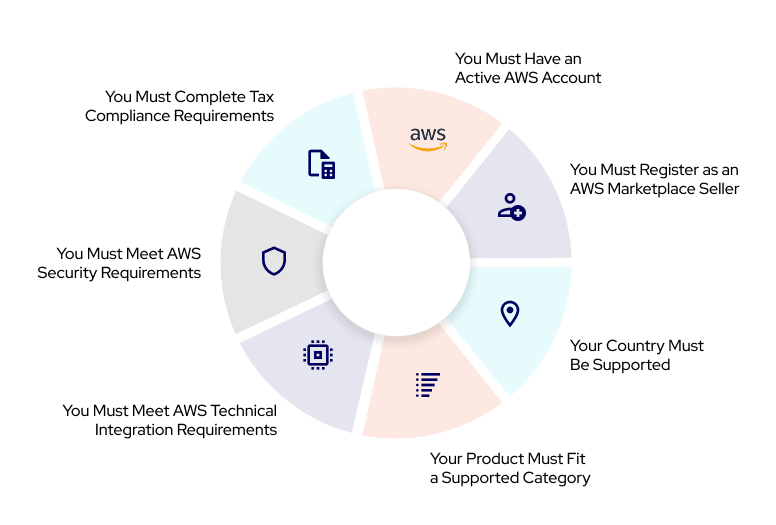
To sell on AWS Marketplace, your organization must meet eligibility, legal, technical, and operational requirements. These prerequisites ensure your product can be sold, billed, and supported consistently in an AWS-compatible manner.
Before the complete breakdown, here’s a quick look at the requirements:
1. An active AWS account
This account becomes your Marketplace management identity. It must have:
- Administrators who manage listings
- Financial contacts for tax and payouts
- Technical owners for integration
- Security compliance owners
Without this foundational AWS account, you cannot begin the listing process.
2. Register as an AWS Marketplace seller
You can register yourself by visiting the AWS Marketplace Management Portal. For the registration you require:
- Company contact information
- Customer support details
- Payment bank account
- Tax documentation
- Acceptance of AWS Marketplace agreements
3. The country must be supported
AWS allows Marketplace sellers only in approved geographies due to regulatory and tax complexities. If you are located in a non-supported country, you must sell through a reseller. You can find the list of countries supported here.
4. Product must be a supported category
AWS does not allow arbitrary product types. You must select an approved listing category:
- SaaS
- AMI
- Container-based product
- ML model
- AI Agent
- Professional services
Each category has different integration requirements and review processes.
5. Meet AWS technical integration requirements
Each product type has a corresponding set of technical requirements. If you are listing a SaaS product, you must implement:
- A registration URL
- Entitlement checks
- Metering (if usage-based pricing applies)
- A subscription activation flow
- A subscription deactivation flow
You can also work with a platform like Clazar, which can manage technical integrations and streamline the listing process, making it easier to sell on the AWS Marketplace.
6. Meet AWS security requirements
Marketplace listings reflect on AWS’s reputation, so security standards are strict. AWS reviews the following:
- Authentication
- Data handling practices
- API usage
- Documentation clarity
- Product functionality
7. Complete tax compliance requirements
You are required to submit the appropriate tax forms for your country of incorporation. A detailed overview is available in the AWS Tax Guide for Sellers and Resellers.
What kind of products can you sell on the AWS marketplace?
To sell on AWS Marketplace, you must have a supported product type. Each type has unique attributes, pricing capabilities, and technical requirements.
The following product types are supported on the AWS marketplace:
1. SaaS products (most common for B2B software)
SaaS listings allow you to sell software hosted in your own environment. You integrate AWS with your subscription system using entitlement or metering APIs.
SaaS is the most common listing type because:
- It suits nearly all modern SaaS companies
- It supports flexible pricing models
- It enables private offers and CPPO
- It aligns with AWS co-sell programs
SaaS pricing options
You can choose:
- Flat monthly or annual subscription
- Usage-based pricing
- Contract pricing
- Hybrid pricing
2. AMI-based products
Amazon Machine Image (AMI) listings are virtual machine images that can be deployed on Amazon EC2.
An AMI is specific to the following:
- Region
- Operating system
- Processor architecture
- Root volume type
- Virtualization type
AMI listings are appropriate when customers need to run your software within their own AWS environment.
AMI pricing options
You can choose:
- Bring your own license (BYOL)
- Paid hourly or hourly-annual
- Paid monthly
- Usage-based pricing
- Contract pricing
3. Container products
Container-based listings allow you to deliver Docker images that customers can run on ECS, EKS, or Kubernetes clusters.
Best for:
- Enterprise infrastructure tools
- Kubernetes native applications
- Developer productivity products
Container product pricing options
You can choose:
- Bring your own license (BYOL)
- Monthly
- Custom metered pricing dimensions
- Per task or per pod hourly price
- Hourly pricing or custom metering pricing with a long-term contract
- Container contract pricing
Important note: On March 1, 2026, AWS Marketplace discontinued Quick Launch for Helm chart deployments on Amazon EKS. Existing deployments will continue running normally. You can still deploy using standard Helm commands or container images on Amazon ECS.
4. Machine learning models
AWS Marketplace supports ML model listings that customers can deploy in SageMaker. These are popular with AI, analytics, and data science vendors.
There are two types of SageMaker AI products listed in AWS Marketplace:
- Model package: A pre-trained model for making predictions that does not require any further training by the buyer.
- Algorithm: A model that requires the buyer to supply training data before it makes predictions.
Machine Learning models pricing options
You can choose:
- Free pricing
- Hourly pricing
- Inference pricing
- Free trial
5. AI agents and tools
AWS Marketplace now offers an AI Agents and Tools category featuring AI systems that autonomously reason, plan, and execute tasks using foundation models and agentic tools. Buyers can deploy these solutions via API or containers, enabling faster adoption of AI for content creation, analytics, customer service, automation, and security workflows.
When listing or buying an AI agent on AWS Marketplace, you can pick from two deployment models:
- API deployment: where the vendor hosts the agent on their infrastructure and exposes its functionality via APIs. This model is ideal for complex agents or those using proprietary models, where infrastructure or computation is abstracted away.
- Container deployment: where agents (and their supporting tools) are packaged as containers that the buyer can deploy within their own AWS environment. This gives buyers more control over data, compliance, infrastructure, and custom configurations, which is often required when dealing with sensitive or regulated data.
6. Professional services
These are used for training, onboarding, implementation, or advisory services related to your software. While usage units cannot price professional services, they can complement SaaS listings. Professional services are typically sold through customer-specific private offers, where the buyer and seller agree on the scope, price, and payment terms.
Professional services pricing options
You can choose:
- Installment plan
- Upfront payment
- Variable payments
How to sell on AWS Marketplace (Step-by-step process explained)
To sell on AWS Marketplace, you need a complete understanding of the listing workflow. Most sellers underestimate the level of detail required to get a listing approved, leading to delays and unnecessary rework.
You can either do this process yourself or work with a Clazar expert to go live in less than two weeks.
Here is a step-by-step breakdown of how to sell on AWS Marketplace:
Step 1: Register as an AWS Marketplace seller
Start by creating or updating a seller profile at the AWS Marketplace Management Portal. At the time of seller registration, you must provide:
- Company legal name
- Public-facing display name
- Primary seller contact
- Customer and support contact details
- Banking information for disbursements
- Tax information depends on your country of incorporation
- Agreement to AWS Marketplace Seller Terms
During the registration, AWS will check:
- Whether your legal entity is valid
- Whether your tax identification is correct
- Whether your banking details can support international payouts
- Whether your company operates in a supported region
The listing on AWS Marketplace can take anywhere from a few days to two weeks.
Step 2: Choose the right product type and pricing model
Choosing your product type is one of the most important early decisions. AWS supports several listing types (explained earlier):
- SaaS
- AMI
- Container
- AI Agent
- ML model
- Professional services
When choosing a pricing model, AWS offers multiple plans based on the product type. You can opt for a monthly, yearly, tiered, usage-based (metered billing) subscription, contract, or hybrid pricing.
Step 3: Create and optimize your listing content
This step is often underestimated. The quality of your AWS marketplace listing directly affects discoverability, co-sell engagement, conversion rates, and how customers perceive your brand.
Your AWS Marketplace listing must include:
- A strong product title
- A concise summary description
- A long, detailed product description
- Key features and benefits
- Use cases and problem statements
- Supported regions
- System requirements (if relevant)
- Architecture diagrams
- Pricing details and plan descriptions
- Customer support information
Pro tip: To optimize your AWS marketplace listing, make sure to add:
- Use keywords customers actually search for.
- Write short, benefit-focused descriptions at the beginning of the long description.
- Add customer use cases and industry applicability for relevance scoring.
- Insert architecture diagrams to show how your product fits into AWS workflows.
Step 4: Complete technical integration
Technical integration is where many companies encounter complexity. To sell on AWS, your product requires correct handling of entitlements, activation, cancellations, and, if applicable, metering.
Technical requirements vary by listing type. If you are listing SaaS, you must implement:
- SaaS product registration URL
- Buyer registration workflow
- Entitlement checks to confirm the customer has an active subscription
- Metering (only if you bill based on usage)
Many SaaS companies underestimate the time required to get this right. It is common for SaaS integration to take weeks, depending on engineering bandwidth.
If you are listing AMI or container products, don’t forget to:
- Create images according to AWS requirements
- Perform vulnerability scanning
- Build and validate images
- Provide deployment documentation
- Ensure security and runtime compliance
Step 5: Submit your listing for AWS review
Once your listing content and technical integration are complete, you submit everything to AWS for review. AWS will evaluate the :
- Product functionality
- Accuracy of documentation
- Security posture
- Pricing correctness
- Entitlement or metering accuracy
- User experience quality
- Compliance with Marketplace guidelines
If AWS detects issues, it returns the listing to you with revision instructions.
How long does the AWS review take?
AWS does not guarantee one universal review timeline for every product. The time required depends on the product type, integration complexity, completeness of the submission, and whether changes are required during review.
That said, we’ve seen AWS review process to typically take:
- 3 to 10 business days for SaaS
- 5 to 14 business days for AMI and container products
Step 6: Go live and validate end-to-end
Once AWS approves your listing, it becomes publicly available on the AWS Marketplace. After going live, you must:
- Test purchases
- Validate entitlement activation
- Validate cancellation flows
- Confirm correct metering data
- Confirm earnings appear in AWS Marketplace Revenue Reports
- Update internal documentation
- Notify your sales, CS, and partner teams
This last step is crucial. If your team does not know how to position AWS Marketplace during deals, utilization will be low.
How much does AWS Marketplace charge you for selling products?
AWS Marketplace charges listing fees on transactions. The fee depends on the product type and offer structure.
AWS's current standard listing fees include:
All CPPO transactions have a 0.5% uplift on the listing fee, regardless of the offer type or deployment method. For example, if the reseller extends a $500k SaaS private offer, the listing fee would be 3.5%.
Sometimes, AWS also adds a region-specific listing fee. For example, South Korea has an additional listing fee of 1%.
Professional services have their own Marketplace fee structure.
Because AWS Marketplace fees can change and can vary by seller location and transaction structure, always check AWS's current fee documentation before modeling deal economics.
What pricing models can you use on AWS Marketplace?
The pricing options available on AWS Marketplace depend on the product type.
Common approaches include:
Subscription pricing
Customers pay a recurring amount for access to the product.
This works well for SaaS products with predictable recurring pricing.
Usage-based pricing
Customers pay according to their usage.
Examples include:
- API calls
- Data processed
- Events
- Compute usage
- Other product-specific consumption units
Usage-based pricing requires the appropriate metering architecture.
Contract pricing
Customers commit to a defined quantity or contract value for a specified period.
Contract pricing is commonly used for enterprise transactions.
Contract with consumption
A customer commits to a contract while also paying for usage beyond the contracted amount.
This can work well when a product has a predictable base level of consumption with variable usage on top.
Hybrid pricing
Some vendors combine a recurring subscription with usage-based charges.
The right approach depends on your existing commercial model and how customers buy your product.
How your pricing appears to buyers
When you sell on AWS, make sure to display clearly the following:
- Pricing summary
- Pricing units
- Contract options
- Usage measurement methods
- Renewal terms
Clear pricing builds trust and reduces the number of clarifying questions during procurement.
How does AWS Marketplace billing work?
AWS Marketplace handles the Marketplace transaction, including customer billing and seller disbursement.
For sellers, this means Marketplace can reduce the need to build separate payment and collection processes for Marketplace transactions.
However, your finance team still needs to reconcile Marketplace transactions with your internal systems.
That can include:
- Orders
- Invoices
- Disbursements
- Listing fees
- Taxes
- Refunds
- Partner margins
- Revenue recognition
As Marketplace volume increases, this reconciliation can become a significant operational task. However, with a platform like Clazar, revenue reconciliation and recognition get simplified too.
What are AWS Marketplace private offers?
An AWS Marketplace private offer is a negotiated commercial offer sent to a specific buyer.
Private offers allow sellers to customize terms rather than relying only on the pricing displayed on a public listing. Most high-value Marketplace transactions happen through private offers, not public listings, and hence, having seamless offer management is a must.
A private offer can include:
- Custom pricing
- Custom payment schedule
- Custom term length
- Optional contract language
- Buyer-specific entitlements
- Multi-year commitments
- Option to co-terminate contracts
To issue private offers, sellers need an eligible public listing.
Why do AWS private offers matter?
Private offers allow you to mirror your direct selling pricing strategy, negotiate enterprise pricing, offer volume discounts, and close deals faster by letting AWS handle billing. In addition, private offers can mean lower listing fees.
What can you customize in a private offer?
Price, term, discount levels, payment cadence, start dates, end dates, and EULA are some of the factors you can customize via private offers. This means private offers can replicate nearly any commercial structure you offer in direct sales.
When should you use a private offer?
Private offers are particularly useful when:
- An enterprise customer has negotiated pricing
- The customer needs a multi-year agreement
- The deal requires a custom payment schedule
- You need to offer volume discounts
- The customer wants to transact through AWS
- Your sales team wants to move an existing direct deal through Marketplace
A private offer brings the commercial flexibility of enterprise sales into the Marketplace procurement path.
How do you create and send a private offer on AWS Marketplace?
Here is the step-by-step process to send a private offer:
- Log in to the Marketplace Management Portal
- Select your product
- Create a private offer
- Enter the buyer’s AWS account ID
- Add pricing details
- Upload custom terms if needed
- Submit for AWS validation
- Buyer accepts the offer
Agreement-based Offers (ABOs) allow you to modify an existing private offer mid-contract. For example, if the buyer increases usage, adds more seats, or wants a longer term.
Watch this video to understand AWS Marketplace private offers in more detail:
What is a CPPO in AWS?
CPPO in AWS stands for Channel Partner Private Offers. It allows approved consulting partners to create and sell private offers on your behalf.
The ISV establishes a selling authorization with the channel partner. The partner can then create a private offer for its customer, using the commercial terms authorized by the ISV.
Here’s how CPPO works, in brief:
- The ISV authorizes the channel partner to resell its product
- The channel partner creates a private offer for the customer
- The customer accepts the offer through AWS Marketplace
- AWS Marketplace handles the transaction and distributes funds according to the applicable arrangement
Why CPPO is important
- It expands your distribution without building your own partner billing system
- Partners earn a margin, which motivates them to sell your product
- You gain access to new customer pipelines
- It is easier to sell into regulated industries with partner assistance
- It makes your Marketplace listing more flexible and enterprise-ready
Step-by-step guide for creating a CPPO
With Clazar, you can manage the entire CPPO lifecycle, from creation to tracking, from the Clazar platform and even the CRM of your choice, such as Salesforce.
When should you use AWS CPPO?
CPPOs help you accelerate cloud sales on AWS Marketplace. It can be useful when you want to:
- Expand your channel distribution
- Work with consulting partners
- Let resellers with enterprise relationships transact through Marketplace
- Reach customers through regional partners
- Add implementation or managed services around your product
- Give partners a Marketplace-based procurement route
- Close details that require local billing entities
CPPO becomes particularly valuable when Marketplace is part of a broader partner-led sales strategy rather than simply a direct sales channel.
What is co-selling, and how can ISVs co-sell with AWS?
AWS co-sell is a joint sales motion in which an ISV and AWS work together on customer opportunities by sharing relationships, resources, and deal pipelines.
The goal is not simply to have AWS mention your product. Effective co-sell requires a clear business case for why your and AWS solutions are better together. To present a unified solution to customers that delivers more value, while also creating shared growth and quicker sales outcomes for each partner.
What is co-selling with AWS?
Co-selling with AWS refers to a joint sales approach in which Independent Software Vendors and AWS work together to deliver combined solutions to customers. This collaboration leverages the strength of AWS cloud services along with the ISV’s product expertise to drive larger opportunities and shorten sales cycles.
The process often runs through AWS Marketplace and the ISV Accelerate Program, using tools such as the APN ACE portal to share pipelines, unlock incentives for AWS sellers, and increase visibility, helping speed up customer transformation.
Why AWS co-sell matters for Marketplace success
AWS field sellers have a quota. They earn compensation when AWS consumption grows. Marketplace transactions increase AWS consumption, which means AWS sellers have a reason to support deals that close through Marketplace.
This alignment means AWS field sellers can:
- Introduce your solution to accounts where it is a fit
- Validate your deal inside AWS Partner Central
- Influence customer buying decisions
- Help you navigate enterprise procurement
- Escalate internal blockers
- Provide insights into the customer’s AWS strategy
This can be the difference between a slow, friction-filled sales cycle and a fast, collaborative enterprise deal. AWS sellers lean in when there is a strong “better together” story.
You can learn more about how AWS partner programs structure these incentives here in Clazar’s guide to AWS partner programs.
How AWS co-sell works in practice
Co-sell becomes operational through AWS Partner Central and ACE (AWS Customer Engagements). Here is the workflow SaaS companies follow:
Step 1: Register opportunities in AWS Partner Central
Once your sales team identifies a Marketplace-qualified deal, you enter it into ACE. This gives AWS visibility into the opportunity.
Step 2: AWS validates the opportunity
AWS partner managers or field sellers review the opportunity and decide whether to support it. They look for:
- Customer cloud usage
- Fit with AWS services
- Revenue alignment with AWS’s goals
- Whether Marketplace is the right route to transact
When validated, the opportunity becomes visible to AWS teams involved in the account.
Step 3: AWS sellers engage the customer
AWS sellers support partners by:
- Providing customer context
- Coaching partners on account strategy
- Making introductions
- Advocating for the Marketplace as the procurement route
- Helping structure commercial terms within Marketplace’s framework
Step 4: The deal closes through AWS Marketplace
When the deal closes through AWS Marketplace, both you and AWS benefit:
- You close the deal faster
- AWS increases cloud consumption
- Procurement friction disappears
- Renewals become easier to manage
How AWS Marketplace strengthens co-sell motion
When you sell on AWS Marketplace, you signal to AWS field teams that:
- You are serious about the AWS ecosystem
- Your product is approved and validated
- You have a clean procurement path
- You support AWS’s goal of driving consumption
AWS sellers prefer recommending solutions that support AWS’s goals. Marketplace signals alignment.
Note: AWS has launched a new version of Partner Central that unifies the Marketplace and Partner Central workflows. Clazar is offering a migration service (free for limited partners) to help ISVs move seamlessly to the new experience.
How do AWS Marketplace and AWS co-sell work together?
AWS Marketplace and co-sell solve different parts of the sales process.
Co-sell helps create and influence the opportunity.
Marketplace provides a procurement and transaction route.
A mature AWS sales motion can therefore look like:
Identify opportunity → Engage AWS → Develop joint solution → Negotiate commercial terms → Create Marketplace offer → Close → Renew and expand
This is why Marketplace should not be treated as simply a listing project.
For enterprise SaaS companies, it can become part of the broader AWS revenue motion.
How do AWS Marketplace renewals and amendments work?
Marketplace selling does not end when the initial transaction closes.
Sellers may need to manage:
- Renewals
- Upgrades
- Additional quantities
- Changes to payment schedules
- Contract changes
- New entitlements
- Amendments
AWS supports upgrades, renewals, and amendments for certain product and offer types. The available options depend on the original agreement and product configuration.
This is one reason Marketplace operations become more complex as your customer base grows. A team managing a handful of Marketplace transactions can often handle them manually. But managing hundreds of offers, renewals, amendments, and partner transactions needs a more systematic workflow.
Should you manage AWS Marketplace manually or use automation?
The answer depends on your Marketplace maturity.
Manual management can work when:
- You have a small number of Marketplace transactions.
- You are still testing the channel.
- Your sales team creates only occasional private offers.
- You have limited partner activity.
- Finance can reconcile transactions manually.
Automation becomes more valuable when:
- Marketplace is becoming a significant revenue channel.
- Sales creates private offers frequently.
- Multiple teams need to approve offers.
- You have a growing AWS co-sell pipeline.
- You manage CPPO relationships.
- Marketplace data needs to sync with your CRM.
- Finance spends significant time reconciling Marketplace revenue.
- You sell through multiple cloud marketplaces.
The goal of automation is not simply to make Marketplace administration faster. It is to make Marketplace a repeatable part of your revenue process.
Best cloud GTM platform to list and scale on AWS Marketplace
1) Clazar (Top platform to list and scale on AWS Marketplace)
Clazar is the leading cloud GTM platform for ISVs looking to list on AWS Marketplace and scale revenue through repeatable execution. It helps teams operationalize AWS Marketplace selling by bringing workflows like private offers, approvals, and deal execution directly into Salesforce or HubSpot, so sellers do not have to switch between portals or spreadsheets.
Clazar also supports scaling AWS co-sell motions and gives GTM and finance teams a unified view of AWS Marketplace pipeline, revenue, and performance, making Marketplace a scalable, core revenue channel.
Best for: ISVs that want an end-to-end platform to list, co-sell, and scale revenue on AWS Marketplace
Limitations: Not ideal for teams that only need lightweight listing support and do not plan to scale Marketplace sales motions
2) Tackle
Tackle is a well-established Marketplace platform that helps ISVs manage Marketplace operations across cloud providers, including AWS Marketplace. It is commonly used by teams that want structured support for listing.
Best for: ISVs setting up multi-cloud Marketplace operations with a focus on listing and driving initial transactions
Limitations: Can require additional internal coordination to drive private offers and AWS co-sell at scale. Need to work with professional services to setup automations.
3) Suger
Suger is a GTM tool designed to make AWS Marketplace selling more CRM-friendly for revenue teams by aligning Marketplace execution with standard sales workflows.
Best for: Sales-led teams that want AWS Marketplace execution closely aligned with CRM workflows
Limitations: Often requires deeper automation for co-sell and revenue visibility as scale increases
4) Labra
Labra supports ISVs with AWS Marketplace listing enablement and technical readiness, helping streamline packaging and fulfillment workflows.
Best for: ISVs that need strong technical support to get listed on AWS Marketplace
Limitations: Limited support for end-to-end revenue execution and co-sell scaling
Top AWS programs to help ISVs sell on AWS Marketplace
AWS offers a variety of funding programs and financial incentives through the AWS Partner Network (APN) and direct customer enablement paths. These programs help support your go-to-market efforts and scale AWS usage.
Here are the top AWS programs to keep in mind:
1. AWS List & Sell Program
AWS Marketplace List & Sell program is a promotional program that helps AWS Partners grow their SaaS business. It is exclusively for organizations that receive support from participating AWS Marketplace Partners, such as Clazar.
What are the benefits of the program?
Qualifying partners (ISVs) earn $10,000 in promotional credits for launching their new SaaS offering on AWS Marketplace.
How can I be eligible for the AWS List and Sell program?
The following are the requirements for the program:
- For yearly contract product: Reach $65K in TCV, or 10+marketplace private offers within 12 months
- For PLG product: $5500 or 10+ Active Monthly Subscription within 12 months
2. ACE-CRM Integration Credits Program
The ACE-CRM Integration Credits Program is an incentive initiative provided by AWS for members of the AWS Partner Network (APN). The program reimburses ISVs for connecting their internal CRM (like Salesforce, HubSpot, or custom platforms) directly to the AWS Customer Engagement (ACE) Pipeline Manager.
What are the benefits of the ACE-CRM integration program?
Under the ACE-CRM Integration program, AWS offers $10,000 in AWS Credits (pending eligibility requirements outlined below).
How can I be eligible for the ACE-CRM integration credits program?
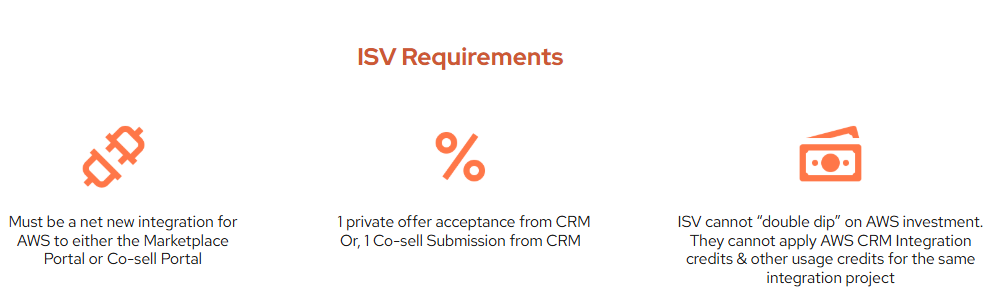
It is available via Clazar’s CRM integration package and requires:
- Must be a net new integration for AWS to either the Marketplace Portal or Co-sell Portal
- One private offer acceptance from CRM or one co-sell submission
- ISV cannot “double dip” on AWS investment. They cannot apply AWS CRM Integration credits and other usage credits for the same integration project.
3. AWS Seller Prime
AWS Seller Prime is designed to help independent software vendors grow their SaaS business by accelerating self-service user acquisition, increasing recurring revenue from usage, and expanding long-term contracts.
What are the benefits of the AWS Seller Prime program?
It provides guidance, tools, and reporting to improve go-to-market planning and execution, including a PLG (product-led growth) GTM enablement kit, analytics, and marketing support.
Additional benefits include up to $40,000 in reimbursable marketing funds and prioritized AWS-led exposure for sellers who meet the program requirements.
How can I register for the AWS Seller Prime program?
Registration begins with completing a strategy document to align goals and resources with the Seller Prime team.
How to scale AWS marketplace sales with automation (using Clazar)
Scaling AWS Marketplace sales will eventually overwhelm any team relying on manual steps. As deal volume increases, processes that once felt manageable turn into bottlenecks across sales, revenue operations, finance, and engineering.
This is why Clazar has become the top solution for ISVs looking to grow on AWS Marketplace quickly and accurately.
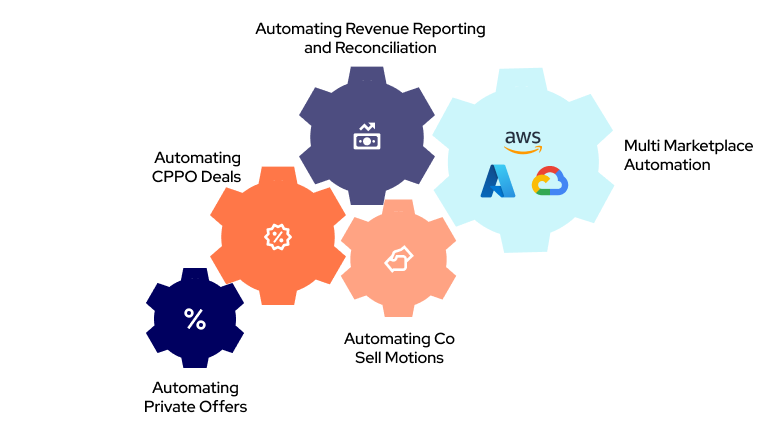
Streamlining AWS private offer management
Clazar allows sales teams to generate private offers directly from the CRM, revenue operations to manage approvals, and finance to track payouts without manual effort. The result is faster deals with fewer errors.
Managing CPPO deals from CRM
CPPO deals introduce added complexity through partner margins, shared revenue, and regional rules. Clazar automates partner authorization, offer creation, margin calculations, and contract workflows so teams can execute CPPO motions at scale without extra overhead.
Automated co-sell management
With Clazar’s integration to AWS Partner Central, opportunities sync automatically, AWS sellers gain visibility earlier, and reporting becomes consistent across systems. Teams avoid duplicate data entry and accelerate co-sell outcomes.
Revenue reporting and reconciliation
AWS Marketplace payouts involve complex files and multi-step reconciliation. Clazar analytics automates disbursement tracking, revenue reconciliation, billing cycles, refunds, partner margins, and more to support accurate revenue recognition.
Future-ready with multi-marketplace management
For companies selling on Azure or GCP in addition to AWS, Clazar centralizes listings, offers, entitlements, and analytics in one platform. This ensures your cloud GTM strategy is future-proof and ready to scale across any marketplace.
By automating every core workflow, Clazar removes the operational friction that slows down cloud marketplace growth. ISVs can scale sales, improve accuracy, and fully unlock the revenue potential of AWS Marketplace with a single trusted platform.
What are the common mistakes new AWS Marketplace sellers should avoid
If you are preparing to sell on AWS Marketplace for the first time, small missteps can slow down your launch or block approvals. After helping more than 300 software companies list and scale on AWS Marketplace, the Clazar team has identified five mistakes new sellers should avoid:
1. Using a personal AWS account or root credential
New sellers often start with the wrong account structure. Always register through a dedicated business AWS account with IAM roles to ensure secure, compliant access when you list and sell on AWS Marketplace.
2. Delaying tax and bank setup
AWS cannot process disbursements without validated tax documents and a verified bank account. Many first-time sellers lose weeks here. Complete this step early to speed up your AWS Marketplace launch.
3. Poor listing presentation
Your product listing must be optimized with buyer keywords. If your title, description, or value proposition does not match the language customers use, your product becomes invisible in AWS search. Strong copy helps you stand out when you sell on AWS Marketplace.
4. Treating the listing as a one-time task
An AWS Marketplace listing needs ongoing updates. Refresh your content, versions, and offers regularly to keep your listing accurate and engaging.
5. Ignoring private offers and partner motions
Most enterprise deals close through custom private offers or partner-led CPPO deals, not just the public listing. Sellers who skip these paths leave significant revenue behind. Clazar supports private offers and CPPOs from the UI or directly within your CRM.
By avoiding these mistakes, new sellers can launch faster, stay compliant, and start generating revenue on AWS Marketplace with confidence.
Take AWS Marketplace from listing to revenue
Getting listed is only the beginning. The companies that get the most value from AWS Marketplace treat it as part of their broader cloud GTM strategy.
That means connecting:
Listing → Sales → Private Offers → AWS Co-Sell → Partners → Renewals → Revenue Operations
Clazar helps software companies operationalize that motion by bringing AWS Marketplace workflows into the systems their revenue teams already use.
With Clazar, teams can manage Marketplace listings, private offers, co-sell workflows, partner transactions, and Marketplace revenue operations through a more connected workflow.
Ready to make AWS Marketplace a scalable revenue channel?
.png)
.svg)

%20(1).png)
.png)

.png)
.png)