


Share
.svg)
.svg)
.svg)
What is Azure Marketplace and how it works
The Azure Marketplace (now known as Microsoft Marketplace) is Microsoft's digital storefront for finding, trying, and buying cloud solutions, apps, and services from Microsoft and its partners, all certified to run on the Azure platform.
It simplifies procurement by allowing customers to buy solutions directly through their Azure account, with charges consolidated on their Azure bill. Customers get to quickly deploy pre-configured solutions, including virtual machine images, SaaS applications, and container-based solutions, directly into their Azure environment.
For independent software vendors (ISVs), system integrators (SIs), and resellers, Azure/Microsoft Marketplace serves as a global distribution and sales channel, enabling them to reach Azure customers. Let’s see how Microsoft Marketplace works for software buyers and sellers:
How Azure Marketplace works for buyers
Azure marketplace offers software buyers a streamlined discovery and procurement experience. It helps buyers:
- Discover solutions across categories such as security, AI & ML, data, DevOps, business applications, and industry-specific workloads.
- Evaluate Azure marketplace listings with detailed product descriptions, pricing models, vendor profiles, compliance certifications, and often free trials or demos.
- Purchase using flexible pricing options, including consumption-based billing, annual subscriptions, or bring-your-own-license (BYOL), all charged through a single Azure invoice.
- Deploy pre-configured solutions (VM images, SaaS apps, managed applications, containers) with a few clicks, integrated directly into Azure services.
- Centralize procurement and governance by tracking usage, managing subscriptions, controlling access with Azure RBAC, and aligning purchases with enterprise policies.
How Azure Marketplace works for sellers/partners
Accelerate revenue growth on Azure Marketplace by reaching procurement-ready customers, launching flexible offer models, and enabling commitment-backed purchases that reduce buying friction. Software sellers:
- Gain visibility to a global Microsoft customer base, including enterprises already standardized on Microsoft procurement and compliance processes.
- Define pricing and packaging, offer free trials and usage-based billing, create subscriptions, and create private offers for negotiated enterprise deals.
Accelerate enterprise sales by enabling cloud marketplace purchases that align with customer cloud spend commitments (like Microsoft Azure Consumption Commitment), reducing procurement friction and accelerate software sales cycles.
Why sell on Azure Marketplace?
Selling on Azure Marketplace accelerates enterprise adoption, shortens sales cycles, and aligns with how modern buyers want to procure software.
It offers visibility, streamlines transactions (including leveraging customer Azure commitments), and provides access to Microsoft's vast sales network, ultimately increasing revenue and market presence.
Let’s understand why Azure Marketplaces are beneficial for software sellers.
1. Reach enterprise buyers already spending on Azure
Azure Marketplace gives you access to millions of active Azure customers, including large enterprises and regulated industries that already trust Microsoft.
Because purchases count toward customers’ Azure cloud spend commitments, buyers are far more willing to transact, removing one of the biggest blockers in enterprise sales: budget approval.
2. Shorter sales cycles with frictionless procurement
Simplified procurement, billing, and deployment through a centralized platform reduces administrative overhead and shortens sales cycles.
Azure Marketplace fastens the sales cycle by:
- Enabling one-click purchases through existing Azure accounts
- Eliminating vendor onboarding, new contracts, and separate invoices
- Using Microsoft as the billing intermediary
Resulting in a faster deal closure and fewer procurement hurdles.
3. Flexible pricing and deal structures
Azure Marketplace supports multiple monetization models, such as:
- Pay-as-you-go (usage-based)
- Subscriptions (monthly or annual)
- BYOL (Bring Your Own License)
- Private offers for custom pricing, terms, and enterprise negotiations
This lets you support self-serve buyers and complex enterprise deals in the same channel.
4. Built-in trust, security, and compliance
Solutions are vetted and listed under the Microsoft brand, which helps build instant trust with enterprise buyers.
When listing on Azure Marketplace, companies get verified on:
- Security and compliance details
- Microsoft validation and publishing standards
- Alignment with Azure identity, RBAC, and governance
For risk-averse enterprises, this trust layer often becomes a deciding factor in procuring through cloud marketplaces.
5. Simplified billing, collections, and global payments
Customers purchase your solutions directly within their familiar Azure environment, bypassing the lengthy vendor onboarding process.
During the process, Microsoft will handle:
- Invoicing and tax compliance
- Currency conversion
- Payment collection and partner payouts
This allows you to sell globally without building local billing infrastructure, while keeping revenue operations lean.
6. Better alignment with cloud-first buying behavior
Enterprise buyers increasingly prefer to buy software:
- From a cloud marketplace
- Through existing vendors (like Microsoft)
- With centralized spend visibility
Azure Marketplace meets buyers where they already are inside the Azure ecosystem.
7. Strong co-sell and go-to-market advantages
Azure Marketplace listings unlock Microsoft co-sell eligibility, with Microsoft's field sellers, opening doors to new deals and boosting win rates.
This can materially improve pipeline quality and deal size.
What do you need to sell on Azure Marketplace?
To sell on Azure Marketplace, you need a combination of technical readiness, commercial setup, and compliance alignment with Microsoft’s marketplace requirements.
1. A Microsoft Partner account
You must be enrolled in the Microsoft Cloud Partner Program (MCPP). This gives you access to the partner center, the ability to create and manage marketplace offers, and payout setup.
What is required:
- Verified business identity
- Bank account for payouts
- Tax profile (varies by country)
2. A marketplace-ready product
Your solution must run on or integrate with Azure and fit one of Microsoft’s supported offer types:
- SaaS applications (most common for B2B software)
- Azure Virtual Machine images
- Azure Managed Applications
- Containers (AKS-based)
- Azure AI / Data solutions
Make sure your product is production-ready (not beta-only) and secure, stable, and scalable.
It should be capable of being deployed or accessed by customers through Azure.
3. Technical integration with Azure
Depending on your offer type, this may include:
- Azure Active Directory (Entra ID) integration
- Azure billing metering APIs (for usage-based pricing)
- ARM templates or deployment automation
- SaaS fulfillment APIs (for subscription lifecycle management)
Microsoft requires that transactable offers integrate with its commerce and fulfillment systems.
4. A clear pricing and monetization model
Pricing must be transparent and mapped to Azure billing constructs. Below are some of the pricing models of your Microsoft listing:
- Pay-as-you-go or usage-based pricing
- Monthly or annual subscriptions
- BYOL options
- Free trials or test drives
- Private offers for enterprise customers
5. Compliance, security, and legal readiness
Microsoft reviews all offers before publishing. To make this happen, you will need:
- A privacy policy and terms of use
- Clear data handling and security documentation
- Compliance declarations (such as GDPR, SOC, ISO, HIPAA, where applicable)
- A customer support process and SLA
For enterprise buyers, these are often deal-critical.
6. Go-to-market assets for your listing
Your marketplace listing must include:
- Clear product description and value proposition
- Screenshots, diagrams, or demo videos
- Deployment or onboarding documentation
- Support and contact information
A weak listing directly impacts conversions even if the product is strong.
7. Ongoing operational readiness
Once your listing is live, you will need to:
- Manage updates and versioning
- Handle customer support and renewals
- Monitor usage, subscriptions, and revenue in Partner Center
- Stay compliant with Microsoft marketplace policies
Marketplace selling is not “set and forget”; it’s an ongoing channel. Doing this in-house might be time consuming and expensive. Therefore working with a cloud GTM platform such as Clazar can help you list and scale on Azure Marketplace, without heavy lift to build and maintain tooling. Get a free consultation from Clazar team today.
What kind of products can you sell on Azure Marketplace?
Azure Marketplace supports a wide range of cloud-native and cloud-enabled solutions that run on, integrate with, or extend Microsoft Azure. These products are typically sold by ISVs, SIs, and technology partners targeting SMBs to large-enterprise buyers.
Here is a list of products that you can sell on Azure Marketplace:
1. SaaS applications
Cloud-hosted SaaS applications accessible via web or API, can be transacted directly through Azure. These applications integrate with Azure but are managed outside the customer’s Azure subscription.
2. Virtual Machine (VM) images
Pre-configured VM images (like Linux or Windows Server) are ready for deployment and available to be procured via Microsoft Azure marketplace. VMs are best suited for infrastructure, security, and legacy software providers.
Some examples of Virtual Machine images are:
- Firewalls, VPNs, and security appliances
- Databases, data warehouses
- Enterprise software requiring OS-level access
3. Azure managed applications
These are solutions deploying multiple Azure resources (such as using ARM templates) for complex setups. Azure managed applications are ideal for enterprise buyers as it provides governance, lifecycle management, and operational control.
4. Containers and Kubernetes-based solutions
These are primarily suited to cloud-native and microservices architectures and includes containerized applications running on Azure Kubernetes Service (AKS). Some examples are AI/ML inference services, event processing pipelines, and scalable backend services.
5. Data products and APIs
This type of Azure listing mainly covers datasets, APIs, and data services consumable within Azure. Such products enable recurring revenue from data consumption and analytics use cases.
6. AI Agents
An AI agent assists individuals or organizations by leveraging artificial intelligence to automate business processes. This is best for AI-first companies that want to sell their AI products to Azure users.
7. Professional Services
Professional services for Microsoft Cloud include assessments, briefings, implementation, PoCs, workshops, migrations, and support. You can sell them for your own, third-party, or Microsoft software, but only through Private Offers - customers can’t buy them from the storefront. You deliver the service, while Microsoft manages billing, invoicing, payments, and payouts.
How to sell on Azure Marketplace (a step-by-step guide)
To sell on Microsoft Marketplace, you need a complete understanding of the listing workflow. Let’s understand the steps to complete to start selling on Azure Marketplace:
1. Join the Microsoft Cloud Partner Program
The first step to sell on Azure marketplace is to sign up for the Microsoft’s partner center.
2. Create/register your publisher account
Once you enroll on the Microsoft partner center, the next steps are to:
- Log in to Partner Center
- Set up your publisher profile (company name, legal info, payout info).
- Complete your tax and bank payment details.
This establishes your identity and enables you to submit offers. Decide what type of product you’re selling, what the pricing model is, and accordingly prepare the required materials.
3. Create the Marketplace offer
After register successfully, you can create Azure marketplace offers. When you log in to the Partner Center:
- Navigate to Marketplace offers in Partner Center.
- Select + New, provide and choose the appropriate offer type (such as Azure Virtual Machine, SaaS, etc.)
- Fill in the technical configuration and lead management (if you want to receive customer leads)
- Upload any required artifacts such as product binaries, ARM templates, or deployment manifests.
At this stage, you also associate the offer with your publisher account.
4. Configure pricing, plans, and terms
Provide pricing tiers (free, trial, paid), marketplace plans, metering settings (for usage-based billing), and links to terms of use and privacy policy, to ensure all required fields are completed; missing info will block publishing.
5. Review and test your offer
Before submitting it for publishing:
- Use the Preview functionality in Partner Center to test the end-to-end experience.
- Validate deployment flows, billing, and fulfillment.
6. Submit for certification and publish
Once everything is complete, go to Review and publish in Partner Center. Make sure that all pages show status Complete. Once confirmed, select Publish to begin the certification process.
Microsoft will run:
- Automated validations
- Manual technical and content reviews
- Preview creation
- Final publish to Azure Marketplace once all checks are cleared
Publishing typically takes several hours to days, depending on the offer type.
7. Go live
After passing certification:
- Approve the offer preview.
- Click Go Live to make your offer publicly available in Azure Marketplace.
- You’ll receive a notification and a marketplace link to share with customers.
8. Monitor and manage your listing
Once your listing is live, you can:
- Track usage, revenue, and leads in Partner Center.
- Update your listing and plans as needed.
- Consider co-selling with Microsoft or partner-to-partner resale channels to expand reach.
You can do the listing yourself or work with a listing expert at Clazar to go live hassle-free, that too in weeks, not months.
Confused whether to do it in house or work with Clazar? Do a simple ROI calculation here.
Pricing and fees when you sell on Azure Marketplace
When you sell your software through the Azure Marketplace, you control your pricing, but Microsoft charges a marketplace fee for transactable offers purchased through the marketplace.
Here’s how pricing and fees work:
Marketplace Transaction Fee
Microsoft charges a standard store service fee of 3% on transactable offers sold through Azure Marketplace.
This means if a customer pays $100 for your software license through the marketplace, Microsoft retains $3, and you receive $97.
Discount on fees for renewals
If you sell through private offers and the purchase qualifies as a customer renewal, you can apply a 50% discount on the marketplace transaction fee.
- In this case, instead of paying 3%, you would pay 1.5% on the renewal charge.
- This reduced fee applies for the entire term of the private offer.
What qualifies as a renewal?
- Renewal of an existing private offer (including marketplace-migrated deals).
- Upsell opportunities with an existing customer (if classified as a renewal).
You must self-attest the renewal status when creating the private offer in Partner Center to receive the reduced fee.
How Azure pricing works overall
When you create your marketplace offer and plans (such as subscription levels, usage tiers), you define:
- Pricing model (flat fee, user-based, usage-based, BYOL, etc.)
- Regional pricing and availability
- Free trials (SaaS free month, VM image trials)
- Private vs public plans (public listings vs. private deals)
Microsoft uses an agency model for billing:
- You set pricing for your product.
- Microsoft bills customers on your behalf.
- The agency fee (3% or a discounted rate) is deducted before revenue is paid out.
Top Azure Marketplace programs to help ISVs sell on Microsoft Marketplace
Here is a list of the top Microsoft Marketplace programs for ISVs:
ISV Success Program
A flagship Microsoft partner program designed for Independent Software Vendors (ISVs) that helps software companies build, publish, and sell applications on Azure Marketplace.
Some of its benefits are:
- Azure credits & developer tools for building and testing your solution.
- Technical guidance & consultations to optimize your app and onboarding.
- Marketing & sales support to reach new customers and drive transactions.
- Marketplace Rewards are tied to Marketplace performance (see below).
- Go-to-market collaboration with Microsoft sellers and partners.
ISV Success helps you accelerate development, launch faster, and access incentives that make your Marketplace business more scalable and profitable.
Marketplace Rewards
Marketplace Rewards is a performance-based incentive program that helps publishers boost sales and visibility on Azure Marketplace once a transactable offer is live.
From this program you get:
- Azure sponsorship credits to offset your own costs or sweeten customer deals.
- Listing optimization help and marketing support.
- Engagement with Microsoft sellers and co-sell plays.
- Executive endorsements and joint promotional opportunities.
Azure IP Co-Sell Program
Azure IP Co-Sell Program is a co-selling initiative that allows your Azure Marketplace solutions to be actively marketed and sold by Microsoft’s global sales force.
Under the program:
- Microsoft sellers include your solution in customer conversations and proposals.
- Your offers count toward customers’ Azure Consumption Commitments (MACC).
- Accelerates enterprise sales velocity and expands reach.
To qualify, your offer typically must be transactable on Marketplace and meet co-sell requirements set by Microsoft.
Partner-to-Partner (P2P) Sales
Partner-to-Partner (P2P) Sales on the Azure Marketplace involves two or more Microsoft partners collaborating to solve customer needs, often using one partner's solution within the other's offering, facilitated by tools like Partner Center for co-selling, referrals, and managing private offers.
P2P sales leverage the Marketplace's digital commerce platform for seamless transactions, enabling partners to scale their reach, find new opportunities (such as multiparty private offers), and deliver end-to-end digital transformation.
It is a flexible selling mechanism that lets you create private, customer-specific offers and even bundle margin sharing with other partners (like CSPs) to extend your sales channels.
What are Azure Marketplace Private Offers?
Azure Marketplace private offers are customized deals between a software vendor (publisher) and a specific customer with pricing and terms that are not publicly listed on the marketplace. These offers let vendors tailor pricing, terms, and configurations to meet a customer’s unique business, budget, or procurement requirements.
In contrast to standard public listings, which anyone can browse and buy. Private offers are negotiated directly with a specific customer and then delivered privately via the Azure Marketplace interface.
Key benefits of private offers
Azure Marketplace private offers provide several advantages tailored for enterprise procurement:
Custom pricing and negotiated discounts
Customers and vendors can agree on pricing that’s lower than the public list price or structured to meet multi-year or bulk-purchase commitments.
Custom terms and contract attachments
Vendors can attach custom agreements or pricing terms (often as a PDF) directly to the offer, so acceptance of the offer also means acceptance of the contract terms.
Flexible billing and duration
Private offers can include flexible billing schedules, extended contract durations (up to five years), and special time-bound discounts tailored to the deal.
Bundle multiple products/plans
A single private offer can bundle up to 10 distinct products or plans from the same publisher, simplifying procurement and driving better overall pricing.
Faster acceptance and purchase
Once the vendor creates the private offer, customers can often accept and proceed with purchase within minutes—much faster than negotiating standalone contracts outside the marketplace.
Works toward Azure benefits
Purchases made through eligible private offers count toward a customer’s Azure Cloud Consumption Commitment (MACC), helping them meet consumption goals and unlock additional cloud benefits.
What product types support private offers
Private offers support a broad range of Azure Marketplace products, including:
- SaaS applications
- Azure Virtual Machines
- Azure applications and containers
- Professional services (only available via private offers)
- VM software reservations (VMSRs) are also exclusive to private offers
Two types of private offers
ISV-to-Customer Private Offers
- Created directly by the software vendor for their customer.
- The vendor negotiates pricing, terms, and conditions with the customer.
Multiparty Private Offers
- Involve an additional partner (such as a reseller or CSP).
- The vendor and partner co-sell to the customer, often keeping existing business relationships intact while still transacting through Azure Marketplace.
What is the Azure Multiparty Private offer?
An Azure multiparty private offer allows businesses to purchase Azure cloud services through authorized Microsoft partners (resellers) via programs such as the Cloud Solution Provider (CSP) or older Open Licensing. It often comes with benefits such as simplified billing, customized pricing, and access to special credits or discounts through offers like the Azure Plan.
This Clazar guide offers a detailed step-by-step guide to create Azure Multiparty offers.
Key reseller offer types and programs
- Azure Plan (CSP): The modern standard for new customer relationships in the CSP program, offering flexible purchasing for consumption-based Azure services.
- Azure in Open Licensing: A simpler way for small to mid-size businesses to buy Azure credits (OSA Keys) through familiar resellers for consumption over 12 months.
- Azure Credit Offer (ACO): A specific initiative for CSPs to provide customers with fixed free Azure usage to accelerate consumption.
- Resale Enabled Offers (Marketplace): Allows partners to resell their own Marketplace solutions, which count towards customers' Azure consumption commitments.
Benefits for customers
- Buy Azure alongside other Microsoft software through a single reseller
- Partners offer end-to-end support, deployment, and optimization
- Access tailored costs and packages
- Utilize credits and discounted rates through specific plans or programs
Benefits for partners (resellers)
- Sell directly to Microsoft customers
- Handle customer billing and collections via the Marketplace
- Help customers meet their Azure consumption goals
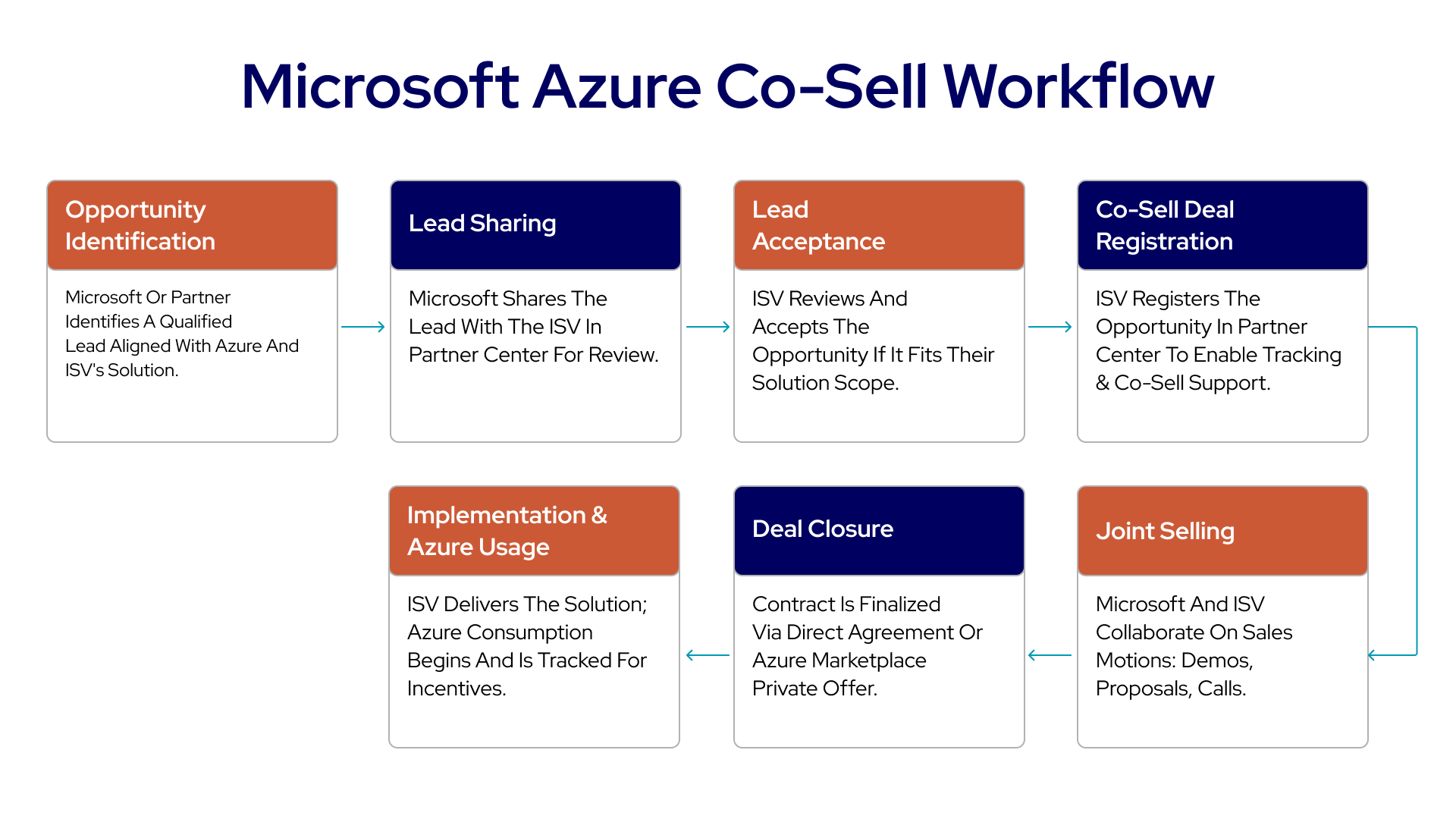
What is co-selling on Azure Marketplace?
Co-selling through Azure Marketplace (part of the Microsoft commercial marketplace) is one of the fastest paths for ISVs to expand reach, accelerate enterprise deals, and align with Microsoft sellers on shared customer opportunities.
It’s a structured cloud GTM motion with eligibility requirements, documentation, and operational discipline that determines how visible (and valuable) your offer becomes inside Microsoft’s internal sales motions.
What “co-selling” with Azure actually means (and why it matters)
Microsoft defines co-sell as collaborative selling between Microsoft and partners that may include:
- Working directly with Microsoft sales teams
- Partner-to-partner (P2P) engagements
- Sharing deals with Microsoft for visibility and forecasting
- Participating in solution assessments where vetted partners help customers evaluate Microsoft-based solutions
The practical advantage is simple: co-sell-ready solutions are surfaced to Microsoft sellers, making it easier for them to discover, pitch, and attach your offer in customer engagements. Once you progress to Azure IP co-sell eligible, your offer can also contribute toward the customer’s Microsoft Azure Consumption Commitment (MACC), which is often a major procurement unlock for enterprise buyers.
How ISVs co-sell with Microsoft Marketplace
1. Publish offer on Azure Marketplace
Your offer must first be live and transactable on Azure Marketplace. This is a prerequisite for any co-sell engagement.
2. Achieve co-sell-ready status
To work with Microsoft sellers:
- Complete your partner profile in Partner Center
- Publish your offer
- Provide required co-sell assets (one-pager, pitch deck, etc.)
Once done, your solution will be co-sell-ready.
3. Achieve Azure IP Co-Sell Eligibility (Optional but Powerful)
For even bigger benefits in Azure Marketplace:
- Meet specific criteria, including revenue thresholds and technical validation.
- Your solution must be an Azure-platform IP offer, such as SaaS, Azure App, VM, or container. Once eligible, your solution becomes Azure IP co-sell eligible.
4. Collaborate on co-sell opportunities
Once you’re co-sell-ready or IP co-sell eligible, you can:
- Share leads and opportunities with Microsoft sellers via Partner Center.
- Register deals for Microsoft assistance in closing them.
- Leverage Microsoft’s influence to build deeper customer engagement.
Co-sell readiness checklist
To become co-sell ready, Microsoft expects you to complete five foundational items:
- Have a PartnerID + active Marketplace account in Partner Center
- Complete your business profile in Partner Center
- Publish a live Marketplace offer
- Provide a sales contact for each co-sell geography
- Submit all required details and collateral in the Co-sell > Solutions section, including a pitch deck and one-pager
Why this matters: Microsoft sellers need consistent, vetted positioning materials to confidently attach your solution to active customer opportunities. The collateral review is part of what determines whether your solution is promoted in Microsoft’s internal seller catalogs.
What are the key Azure co-sell statuses
Microsoft’s co-sell program is tiered. Each tier unlocks increasing access and value:
A) In-market
Your offer is live in Microsoft Marketplace, but you haven’t completed the co-sell readiness requirements yet.
B) Co-sell ready
You’ve met baseline requirements such as having a marketplace account, completing your Partner Center profile, publishing the offer, and submitting required co-sell collateral (like a pitch deck and one-pager) plus sales contacts by geography.
C) Azure IP co-sell eligible
You meet co-sell ready requirements plus additional Azure-specific criteria such as revenue thresholds, technical validation, architecture documentation, and transactability. This tier is also a prerequisite for MACC alignment.
Rule of thumb: Co-sell ready gets you in front of Microsoft sellers. Azure IP co-sell eligible makes your offer materially easier to procure for enterprise accounts (because of MACC).
How to qualify for Azure IP co-sell eligibility
Azure IP co-sell eligibility applies only to specific offer types—SaaS, Azure Applications, Containers, VMs. After you achieve co-sell ready, Microsoft requires four additional criteria for Azure IP co-sell eligibility:
- Revenue threshold: At least $100,000 USD in Azure Consumed Revenue (ACR) or Marketplace Billed Sales (MBS) over the trailing 12 months
- Technical validation: You must meet Marketplace policies, be primarily platformed on Azure, and pass Microsoft’s Azure platform technical validation
- Reference architecture diagram: Upload a diagram (mandatory for most offer types) as part of your co-sell documentation
- Transactable offer: New solutions must be transactable on Marketplace (this has been required since July 11, 2023 for IP co-sell eligible status)
Once eligible, you gain benefits such as:
- Eligibility for your offer’s spend to count toward MACC, which buyers actively seek
- Increased marketplace credibility and signals like badges depending on program status
Best cloud GTM platform to list and scale on Azure Marketplace
1) Clazar (Top platform to list and scale on Azure Marketplace)
Clazar is the leading cloud GTM platform for ISVs looking to list on Azure Marketplace and scale revenue through repeatable execution. It brings key Marketplace workflows like private offers, approvals, and deal execution directly into Salesforce or HubSpot, reducing friction for sales teams.
Clazar also supports Microsoft co-sell motions and provides GTM and finance teams with a unified view of Azure Marketplace pipeline, revenue, and performance, making Marketplace a scalable, core revenue channel.
Best for: ISVs that want an end-to-end platform to list, co-sell, and scale revenue on Azure Marketplace
Limitations: Not ideal for teams that only need lightweight listing support and do not plan to scale Marketplace sales motions
2) Tackle
Tackle is a cloud Marketplace platform that helps ISVs manage listing and transaction workflows across providers, including Azure Marketplace. It provides structured support for Marketplace execution as revenue grows.Tackle is often used by teams building foundational multi-cloud Marketplace operations.
Best for: ISVs focused on listing and transaction management across clouds
Limitations: Requires additional coordination to scale private offers and Microsoft co-sell execution
3) Suger
Suger helps make Azure Marketplace selling more CRM-friendly by aligning Marketplace execution with standard sales workflows. It reduces portal switching for revenue teams. Suger is typically evaluated by sales-led teams looking to integrate Marketplace deals into existing sales processes.
Best for: Sales-led teams wanting Azure Marketplace execution aligned with CRM workflows
Limitations: Limited support for co-sell scaling and Marketplace-wide revenue visibility
4) Labra
Labra supports ISVs with Azure Marketplace listing enablement and technical readiness. It helps streamline packaging and fulfillment workflows needed to operate on the Marketplace. Labra is commonly used when the primary challenge is getting listed.
Best for: ISVs needing technical support for Azure Marketplace listing readiness
Limitations: Limited coverage for revenue execution and co-sell scaling
How to scale Azure Marketplace sales with automation (using Clazar)
As Azure Marketplace deal volume grows, manual workflows quickly become a growth limiter. What starts as a manageable process of creating offers, tracking approvals, and reconciling payouts soon turns into friction across sales, revenue operations, finance, and engineering.
This is why Clazar is becoming the go-to automation platform for ISVs scaling on the Azure Marketplace, helping teams move faster, reduce errors, and treat marketplace sales as a mature revenue channel rather than an experiment.
Streamlining Azure private offer management
Azure Marketplace private offers are essential for enterprise deals, but managing them manually is slow and error-prone.
Clazar enables:
- Sales teams to create Azure private offers directly from the CRM
- RevOps to control approvals, pricing guardrails, and deal structures
- Finance teams to track offer status and expected payouts without spreadsheets
Managing multiparty private offers (MPO) at scale
Azure multiparty private offers add complexity with:
- Channel partner involvement
- Revenue sharing and margins
- Custom pricing and enterprise terms
Clazar automates the entire flow from partner authorization, offer creation, margin calculations, to contract workflows, so teams can run partner-led Azure deals at scale without increasing operational overhead.
Automated co-sell management with Microsoft
Azure co-sell motions require tight coordination across Partner Center, CRM, and sales teams.
With Clazar:
- Co-sell opportunities sync automatically with Microsoft workflows
- Sales teams avoid duplicate data entry across systems
- Microsoft sellers gain earlier and clearer visibility into active deals
- Reporting stays consistent across CRM, Partner Center, and finance
This helps ISVs accelerate co-sell velocity and maximize alignment with Azure GTM.
Revenue reporting and reconciliation for Azure Marketplace
Azure Marketplace payouts can be complex, especially with multi-term contracts, private offers, renewals Partner margins, and credits
Clazar automates:
- Payout tracking and reconciliation
- Revenue attribution by offer, customer, and term
- Refunds, adjustments, and billing cycles
Finance and RevOps teams gain accurate, audit-ready reporting without manual reconciliation.
Why automation matters for Azure Marketplace growth
By automating every core workflow, Clazar removes the operational friction that slows Azure Marketplace sales.
ISVs can:
- Scale enterprise and partner-led deals confidently
- Reduce deal cycle times
- Improve pricing and revenue accuracy
- Turn Azure Marketplace into a predictable, repeatable revenue engine
With Clazar, Azure Marketplace becomes a growth channel rather than an operational burden.
.png)
.svg)

%20(1).png)
.png)

.png)
.png)