.svg)
.svg)
.svg)
Connecting your CRM to your cloud marketplace operations ensures that opportunities, private offers, and deal status move between them without anyone retyping data. You can do it per cloud—AWS Marketplace, Google Cloud Marketplace, Microsoft Marketplace, and so on—with each provider's own tools, or run all your clouds through one integration layer that also connects to Salesforce or HubSpot. This guide walks through both.
There’s a simple reason why this matters. Your sales teams live in the CRM. Your marketplace co-sell data lives in AWS Partner Central, Microsoft Partner Center, and Google Cloud's partner console. When those two don't talk, teams end up moving data manually, and that's where referrals get missed and reports stop matching.
TL;DR
Cloud marketplace CRM integration connects Salesforce or HubSpot to AWS, Microsoft, and Google Cloud. Opportunities, private offers, co-sell referrals, and disbursements then move between the two without anyone retyping data. You have three ways to do it: manual exports, direct partner-portal APIs you build and maintain, or a platform like Clazar that runs one bidirectional sync across all three clouds and both CRMs. Either way, the CRM stays your system of record. Marketplace data writes into its own fields, so your existing schema stays as it is.
What are the benefits of connecting your CRM with your cloud marketplace data?
Integrating cloud marketplace and partnerships data with your CRM closes the gaps between your go-to-market team and your cloud-originated revenue, giving your organization visibility into a channel that often operates as a separate ecosystem.That gap is where revenue leaks.
Here's what you get by closing it.
Complete view of the revenue pipeline
When a customer buys your software through a cloud marketplace like AWS Marketplace, that transaction bypasses your standard direct sales checkout. Without an integration, your CRM only shows half the picture. Syncing this data puts marketplace deals side-by-side with direct sales, so leadership gets one accurate pipeline and forecast instead of two partial ones.
Also, marketplace money moves on its own schedule. Billings, disbursements, and listing-fee deductions land in the cloud portal, not the CRM. Tying each disbursement back to a CRM record ensures clean reconciliation without manual spreadsheet exercises.
Efficient co-sell operations
Cloud providers reward sellers who drive co-sell opportunities with marketplace commitments. Partner portals generate a high volume of inbound referrals and co-sell leads. Bringing these directly into your CRM lets sales reps manage cloud partner referrals and leads within their daily workspace like Salesforce or HubSpot. They don’t need to constantly log into AWS Partner Central or other cloud partner portals.
In addition, automation brings co-sell data to your cloud provider sooner and cleaner, which is what earns seller attention and funding attached to the deal.
Automated private offer tracking
Private offers involve customized pricing, terms, and billing structures negotiated with enterprise buyers. Syncing marketplace data tracks when a customer views, accepts, or lets a private offer expire. This instantly updates the deal stage in your CRM, so your sales and legal teams know the next steps without checking a second system.
Effective customer success and renewal management
Cloud marketplace buyers often have multi-year contracts or metered consumption billing tied to their cloud commitments. Integrating contract start dates, end dates, and usage consumption into your CRM gives Customer Success teams the visibility to spot churn risk and start renewal or expansion conversations early. A single missed renewal, caught too late, can cost more than the integration that would have flagged it.
Reduced manual overhead and data errors
Manually entering marketplace payouts or customer sign-ups into a CRM is slow and error-prone. Automated integration keeps accounts, contacts, and transaction values synchronized, saving operations teams hours of spreadsheet reconciliation at the end of every month or quarter.
Cloud marketplace CRM integration keeps your CRM as the system of record and syncs it both ways with each cloud's co-sell and marketplace system.
How to connect your cloud marketplace data to Salesforce, HubSpot, or other CRMs
There are three ways to integrate a CRM like Salesforce or HubSpot with your cloud marketplace data, depending on your engineering resources and tech stack:
- Manual exports: Someone on your team manually downloads and updates data between your cloud portal and your CRM using Excel or Google Sheets. This works when you’re just starting out. However, it’s prone to human error, and not feasible when your business grows
- Native partner portal APIs: If you prefer building in-house, you can connect directly to partner portals (e.g., AWS Partner Central APIs) through individual integrations. This involves writing custom middleware to fetch data and push it into your CRM via its REST API. However, maintaining point-to-point connections for multiple marketplaces can quickly become complex as cloud schemas differ from each other as well from your CRM fields
- Specialized cloud GTM platforms: Use a platform built explicitly for Independent Software Vendors (ISVs) to manage cloud marketplaces and co-sell. Solutions like Clazar abstract away the fragmented APIs of AWS, Microsoft, and GCP, providing a native, bidirectional sync into your CRM. No engineering overhead needed.
If you go this third route, setup generally looks like:
- Connect your CRM. Authorize the platform to read and write to Salesforce or HubSpot, scoped to the objects and fields you choose
- Connect your cloud marketplace accounts. Link AWS Partner Central, Microsoft Partner Center, and Google Cloud's partner console
- Map your fields. Decide which CRM fields marketplace data writes into — deal stage, contract value, renewal date — and which stay owned by your reps
- Set permissions and automation rules. Choose what syncs automatically (e.g., auto-accepting inbound AWS referrals) versus what needs a rep to review first
- Go live. With Clazar, CRM setup is often done in a day, field mapping included
Pro Tip: The practical test when you evaluate a cloud GTM platform: does it cover more than one cloud, and does it work with your CRM? Teams on HubSpot won’t benefit from tools that only speak Salesforce.
Best practices for integrating CRM with cloud marketplace or partnerships data
Enforce strict commercial data ownership rules
Set clear field-level permissions in your CRM to dictate which fields your sales reps can manually edit, and which get locked down by incoming cloud contract data. Clazar feeds the accurate cloud contract data directly into those designated fields.
Build out downstream customer success workflows
Configure alerts, renewal playbooks, and utilization triggers to fire before accounts reach contract expiration. A platform like Clazar can power these workflows by pulling in the usage, metered billing metrics, end dates, etc.
Establish robust identity mapping and entity deduplication protocols
Use domain-matching or unique cloud identifier rules so that marketplace transactions don’t create duplicate records. Clazar automates most of this through built-in account intelligence and Buyer 360 mapping.
Track the private offer lifecycle dynamically
Keep close tabs on deal progression from initial drafting to buyer acceptance and final expiration so your forecasting remains accurate. Clazar handles this with automated webhook tracking and CRM widget updates.
Have your sales reps actively manage co-sell opportunities
Set up processes that prevent your team from missing inbound referrals or losing time switching between portals. Clazar syncs referrals from AWS ACE and other cloud partner portals directly into your standard CRM layouts.
Monitor sync health and error logs
Watch for API failures, mismatched SKUs, or token expirations before they ruin your monthly revenue report. A platform like Clazar maintains the underlying sync layer and handles error-monitoring for you.
How does Clazar connect your CRM with your cloud data?
Clazar handles cloud marketplace integration across AWS, Microsoft and Google Cloud from one Salesforce or HubSpot setup, enabling co-sell automation as well as marketplace data sync.
It mirrors your marketplace and co-sell data into your CRM with automatic two-way sync. The "look, don't touch" rule ensures no changes are made to your object schemas or existing records, and permissions are scoped to the roles you set.
This means that your reps create and send private offers and co-sell opportunities from the deal they're already working, with pricing and terms pulled in for them. No cloud portal, no second login. What a rep can see and do matches the access you've already given them in Clazar.
Private offers, including AWS CPPO (channel partner private offers), can be created and sent from the CRM, pulling product details, pricing, and terms from the record. Clazar's Automation Builder ships recipes for the common co-sell moves, such as auto-accepting inbound AWS referrals and creating a matching CRM record, so the routine handling runs without a rep touching it.
That automated submission does more than save time. For example, routing partner-originated opportunities to Partner Central automatically is what unlocks certain AWS funding incentives, and Clazar tracks the milestone and files the request.
How Clazar keeps Salesforce and cloud marketplace data in sync
Clazar installs inside your Salesforce instance as smart widgets and connects it to your cloud marketplace listings and co-sell activity. Once connected, co-sell opportunities and related CRM records sync bidirectionally in real time. For example, an AWS co-sell opportunity created or updated in Clazar can push to Salesforce, and Salesforce opportunity data can flow back into Clazar depending on your field mappings.
.png)
Clazar reads only the fields it needs and writes marketplace data into its own custom objects, so your Salesforce setup stays exactly as it was. Listings, contracts, metering, and payouts all sit alongside the deal, so finance and sales work from the same numbers.

How Clazar keeps HubSpot and cloud marketplace data in sync
Clazar installs as an app in your HubSpot account and puts a card on every deal. From that card, reps create and send private offers and start co-sell opportunities for AWS, Microsoft, and Google Cloud, with the deal's details filled in for them.
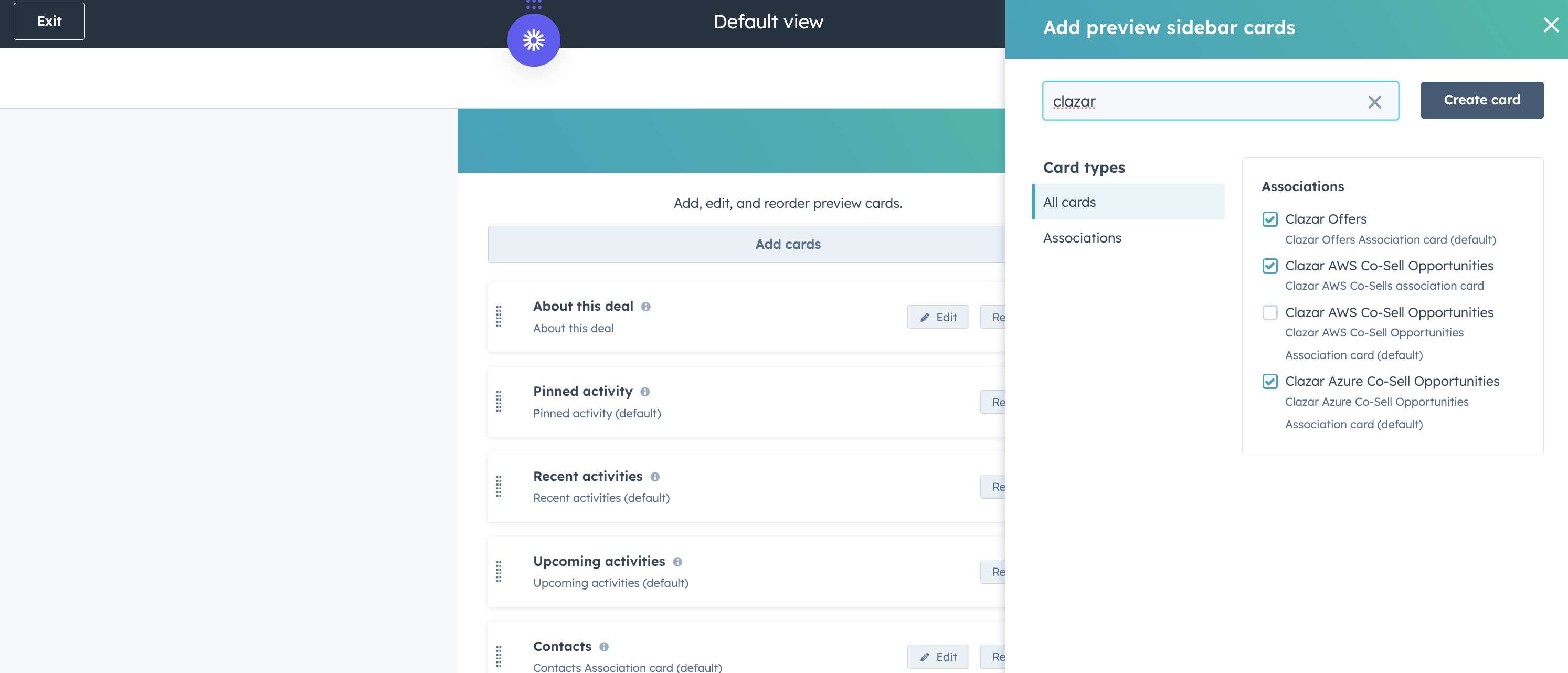
It reads your deals, companies, and contacts, and writes marketplace data into Clazar's own objects, so your HubSpot records stay as they are.
Once mapping is set, co-sell opportunities sync on a daily cycle, with key fields like stage kept current between HubSpot and the cloud partner portals, with no re-keying. Private offers pull their details from the deal at the moment you create them. Everything else, from contracts to payouts, stays next to the deal so your reports read from one source
Automate your marketplace-to-CRM flow with Clazar
Deal velocity, reporting accuracy, and co-sell attainment all improve once your CRM and cloud marketplaces are in sync. Reps stop retyping opportunities, finance stops reconciling by hand, and the cloud field teams see your pipeline in time to act on it.
Cloud marketplace fees and portal requirements are the predictable part of selling through marketplaces. The manual sync between your CRM and cloud portals is the part that costs you deals. Integrating your CRM with cloud marketplaces is what lets you scale the motion without adding manual work.
See how Clazar connects Salesforce (or HubSpot) to AWS, Microsoft and Google Cloud in one setup. Book a demo today.
FAQ
Does AWS Marketplace integrate with Salesforce?
Yes. You can sync AWS Marketplace and its co-sell system, ACE, with Salesforce so opportunities, private offers, and status update in both places without manual entry. You can build the integration against the Partner Central API yourself, or use a platform like Clazar that builds and maintains the connection and writes back to Salesforce.
Can I connect HubSpot to AWS Marketplace?
Yes. HubSpot can connect to AWS Marketplace co-sell the same way Salesforce does: referrals route into HubSpot, and your opportunities push back to AWS. Check that any tool you evaluate supports HubSpot, since some support Salesforce only. Clazar enables a seamless integration between HubSpot and your cloud marketplace and partnerships data.
Can one tool sync AWS, GCP, and Microsoft marketplaces with my CRM?
Yes, Clazar can sync all three cloud marketplaces with your CRM. That's the goal of cloud marketplace CRM integration: instead of building and maintaining a separate integration per cloud, a single integration layer connects one CRM workflow to AWS, Microsoft, and Google Cloud, with one place to manage field mappings across all three.
Can I create and send private offers from my CRM?
Yes. Reps create and send private offers, including AWS CPPO (channel partner private offers), directly from a Salesforce or HubSpot record, with product details, pricing, and EULAs pulled from the deal.
What is AWS ACE, and how does it connect to my CRM?
ACE (APN Customer Engagements) is AWS's co-sell system, where you share opportunities with AWS sellers and receive referrals back. Clazar syncs ACE referrals and opportunity status into Salesforce or HubSpot, so your reps accept, update, and register co-sell deals from the record they already work. The AWS review and approval steps still happen on AWS's side.
Do I need engineering resources to integrate my CRM with cloud marketplaces?
Not with a platform approach. Clazar maintains the sync layer and absorbs cloud portal and API changes, so RevOps or partnerships can run setup without engineering. Building directly against each partner-portal API is the route that needs developers, since you own and maintain every connection as the cloud schemas change.